Edited
Movie Recommender
by Ron Edgecomb
I built Movie Recommender as my final project for CS50’s Introduction to Programming with Python. It’s a terminal application that helps you choose something to watch from a local movie catalog. You can narrow the choices by genre, runtime, release year, and rating, browse the collection, or add movies for later.
Watch the project demo on YouTube.
Why a movie recommender?
The idea came from our family movie nights. We can never seem to settle on what to watch, and sometimes we pick a movie only to run out of time before finishing it. I figured a tool that could help narrow down our choices and account for how much time we had would be very useful. It felt like a good way to tackle a real problem for my family while putting a lot of what I’d learned in CS50P into practice.
What it does
The app has a numbered menu for interactive use and three subcommands for running an operation directly: recommend, list, and add. Both interfaces work with the same catalog and core functions.
- Find something to watch. Combine optional filters and choose how many results to show. A movie must meet every supplied filter, and matches appear in order of highest rating.
- Browse the collection. List the catalog alphabetically, with each movie’s year, runtime, genres, and rating.
- Keep the catalog growing. Add a movie and save it to the CSV file for future sessions. The app checks the details and rejects duplicate title-and-year entries.
How it works
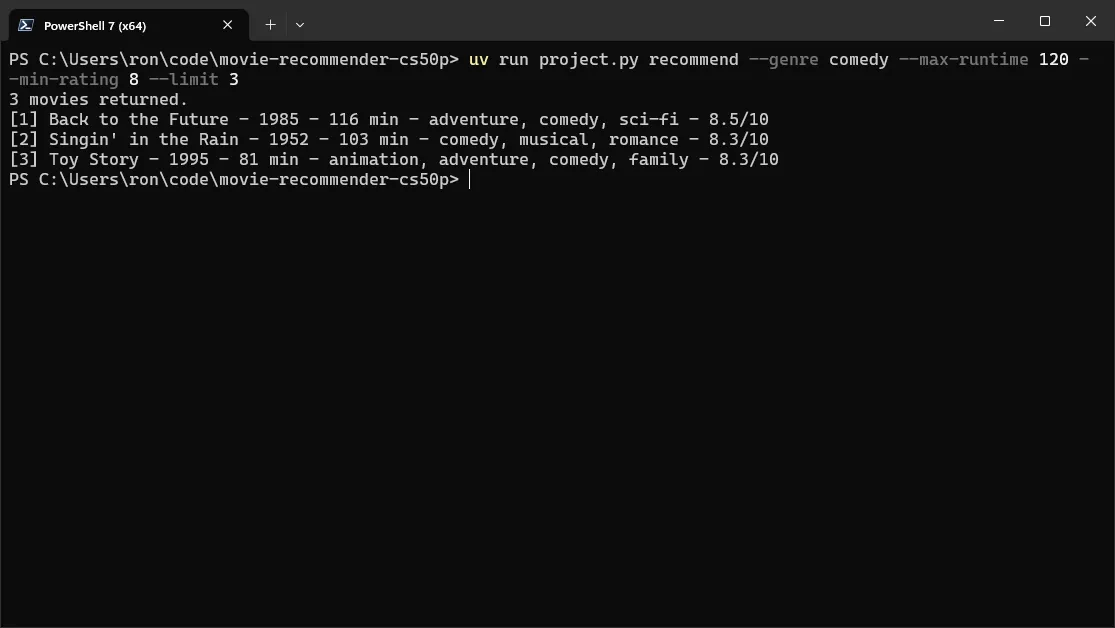
For example, this command asks for up to three comedies lasting no more than two hours, with a catalog rating of at least eight:
python project.py recommend --genre comedy --max-runtime 120 --min-rating 8 --limit 3
With the included catalog, it returns:
3 movies returned.
[1] Back to the Future - 1985 - 116 min - adventure, comedy, sci-fi - 8.5/10
[2] Singin' in the Rain - 1952 - 103 min - comedy, musical, romance - 8.3/10
[3] Toy Story - 1995 - 81 min - animation, adventure, comedy, family - 8.3/10
Genre matching ignores capitalization and uses complete genre names. Runtime and year bounds are inclusive. When ratings tie, results sort alphabetically by title, then by release year.
How it’s built
The application uses Python’s standard library, including argparse for commands, csv for storage, and pathlib for file paths. It has no third-party runtime dependencies needed for normal operation.
The menu and subcommands reflect the two audiences I had in mind: myself and my family. I’m comfortable with the command line, so subcommands let me run an operation directly with the options I need. For the rest of my family, I wanted a more straightforward, interactive experience. The menu guides them through the choices without requiring them to remember subcommands or arguments.
Building both interfaces also gave me a way to practice one of my main goals for the project, which was writing functions I could reuse in different contexts. The core functions in project.py handle input validation, catalog loading, filtering, ranking, and saving. Both interfaces call those same functions, keeping the recommendation rules and catalog checks consistent.
The default catalog lives in data/movies.csv. Each row stores a title, year, runtime, genres, and rating, with multiple genres separated by |. The --catalog option selects a different existing CSV file, and additions are saved to that selected file.
What I learned
The most eye-opening part was putting the whole process of developing a small application into practice. The course’s standalone problems gave me a focused task to solve with explicit pass-fail criteria, but this project made me think more about how all the pieces would work together.
I had to think ahead about what each function needed, what it returned, and how that shaped the next step in the program. Collecting preferences, validating them, filtering the catalog, and ranking the results each made sense on their own, but connecting them into a usable flow took a broader view.
Testing was part of that process, too. I wanted enough coverage to feel confident that I wasn’t overlooking a major mistake. Cases like invalid ratings, runtime boundaries, and duplicate movies helped me think beyond the expected inputs and make the intended behavior explicit. Writing those checks gave me a better appreciation for how planning, implementation, and testing depend on one another.
Putting what I’d learned into a small app for my family felt like a fitting way to finish CS50P. Hopefully, it also means a little less time choosing a movie and a little more time watching one.